SimplePractice - Product Design Intern

Wireframing, UI/UX Design, and Design Systems (Summer 2021)

Tools:Figma, Notion, Asana, Maze, UserVoice, Zoom

Collaborators: Edric Andres-Quentin (Designer/Manager), Peter Chung (Designer), Guiomar Hernan (Product/Project Manager), Sangeeta Srikanth (PM Intern)

Projects:
1. Design System Cleanup and Documentation
2. Header Call to Action (CTA) Button Logic System
3. Navigation Workflow Enhancement Research
4. Prescribing Clinician Product Expansion Exploration

Project 1: Design System Cleanup and Documentation

The design system (June 2021), while organized well into separate files and pages based on type of information (base, components, icons, etc), had a lack of documentation, redlining, and overall polish. I was tasked with cleaning up the design system in its entirety. At the time, the design system, at it’s best, was a sticker sheet that had components grouped together, but with no way to know how/when to use variations of components, such as buttons or headers.

After an initial audit of the entire design system, I found 3 main factors that when improved altogether would enhance the design system greatly: navigation, documentation, and context.

Navigation: After syncing up with other designers on the team and reflecting on my own onboarding experience with the design system, I realized that the design system was difficult and unintuitive to navigate. Although components were organized well, navigating from page to page and finding specific components was difficult. To combat this, I did 3 things:

  • I built a table of contents landing page where designers were able to see an overview of the exact contents of each page. This table of contents contained the page title, description, and clickable link for easy navigation. I added two ways to view this table of contents: 1 on the design system file in Figma, and one in our design team’s Notion page, both of which you can see here.

  • I formatted each page the same way to add some logical reasoning as to how to navigate each page. Before, each page was organized individually and uniquely, so I reorganized files to be viewed horizontally. This way, each page reads like a book.
  • One huge complaint I heard from designers across the board was a lack of searchability and visibility for components, specifically icons. So, I went about researching a new naming convention with alternate name tags so that figma’s built-in component search function would work more optimally for designers.
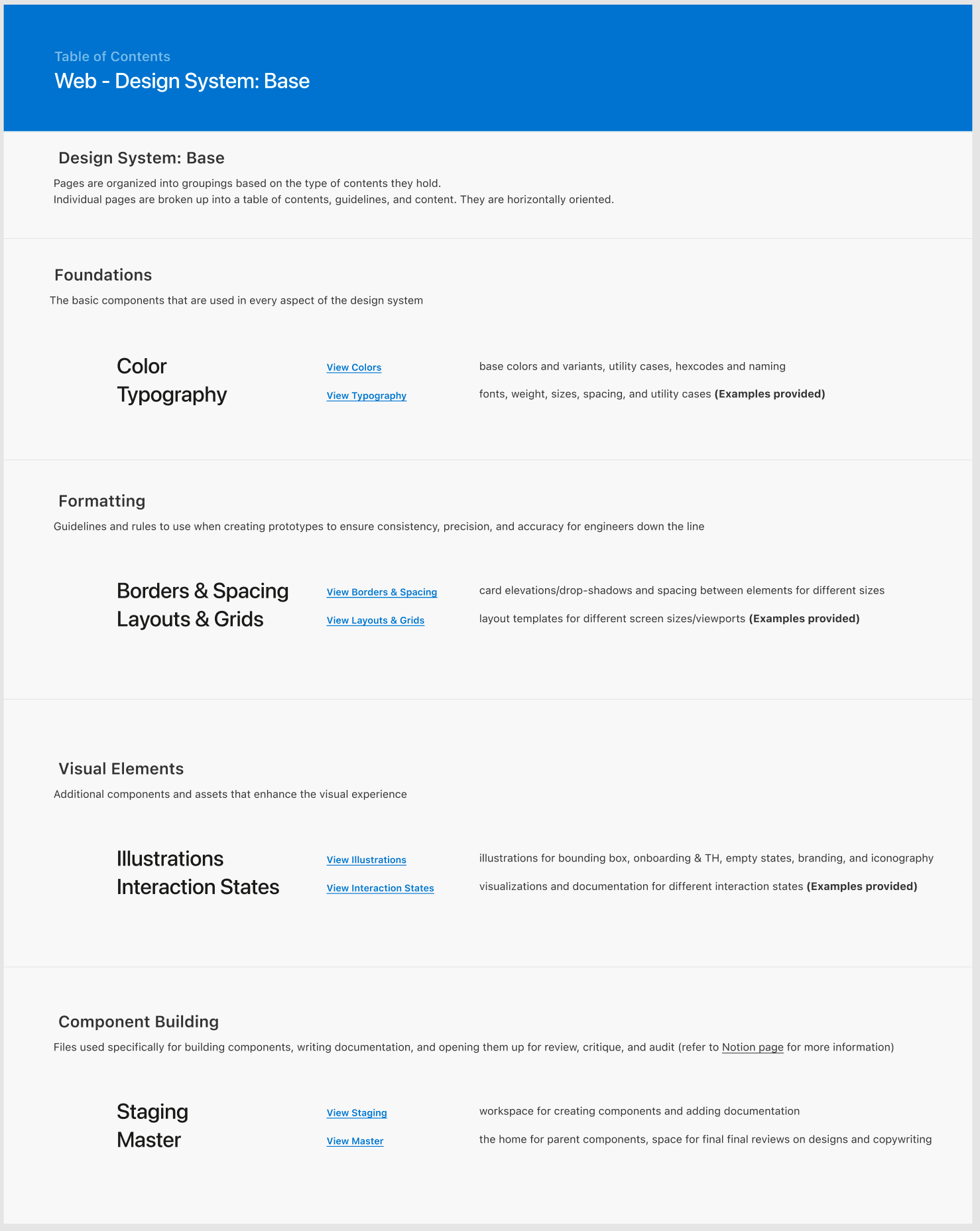
Documentation: In general there was a lack of documentation and commenting in the design system, making it difficult to know what exactly a designer is looking at. To fix this, I added a guidelines caption to every frame that summarizes the exact contents.
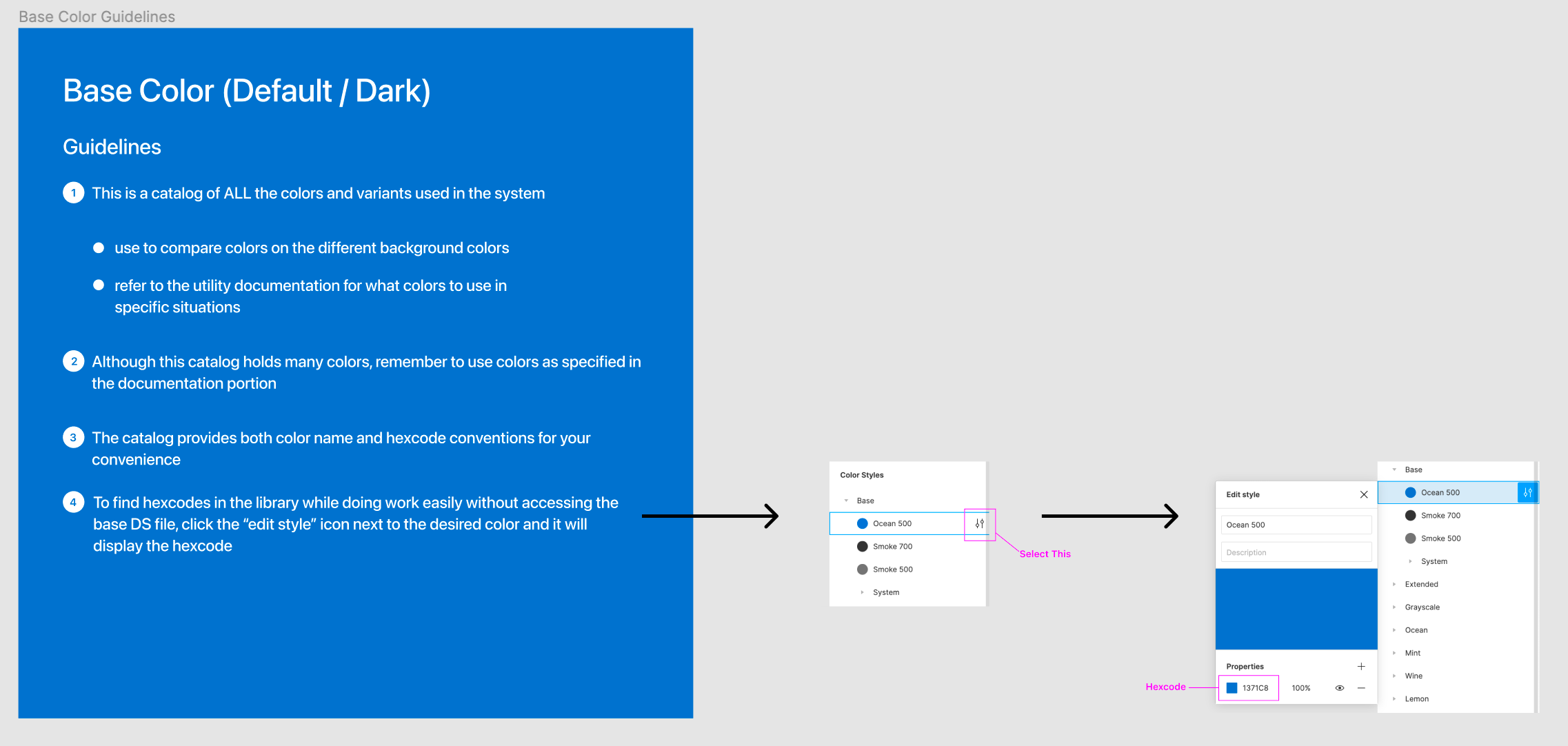
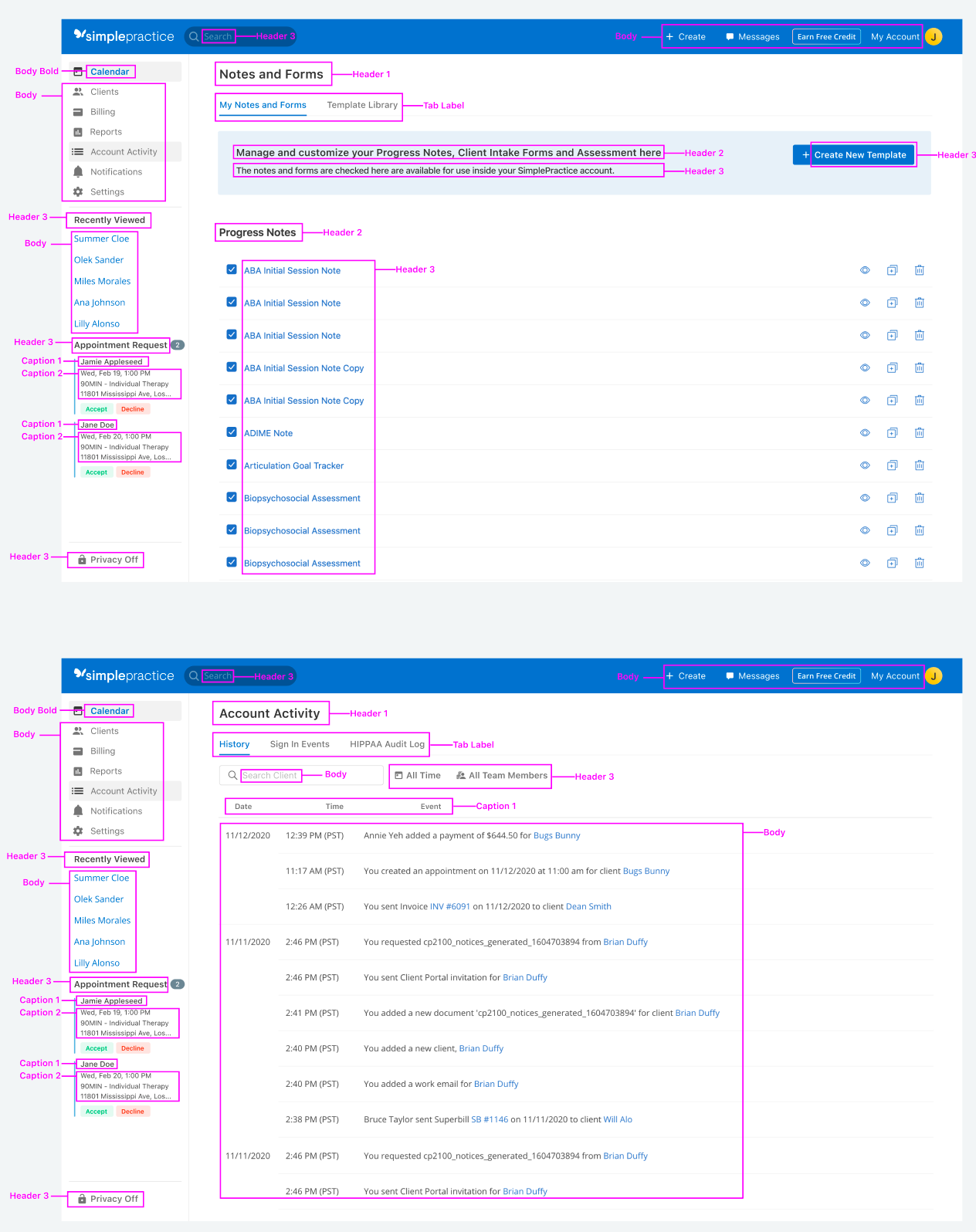
Context: To add to documentation, I also added screenshots and examples pulled from SimplePractice products to show how the components should be used when designing and how they appear in reality when launched.
Project 2: Header Call to Action Button Logic System

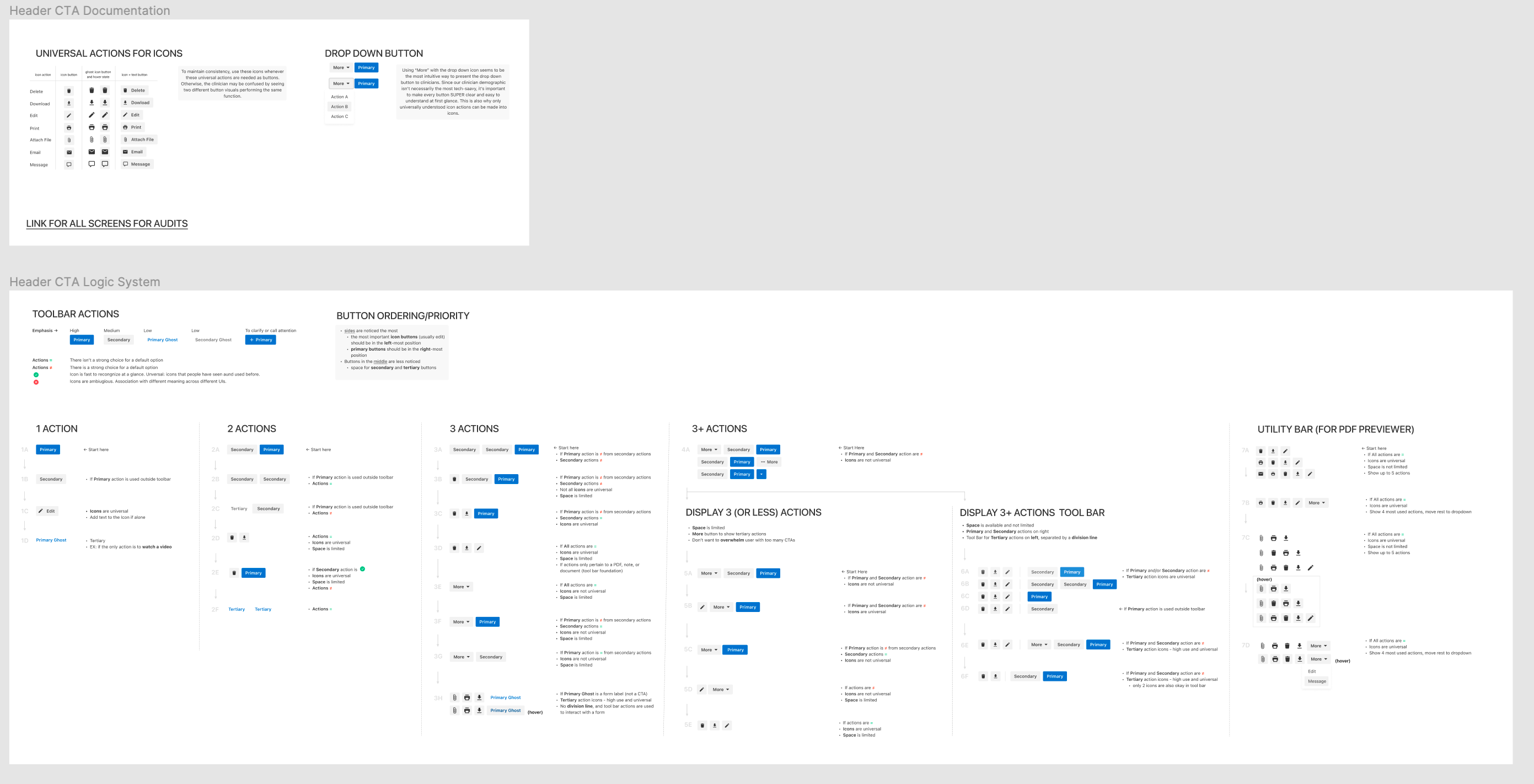
Another issue identified in the design system was that there was no rhyme or reason when placing Call to Action (CTA) buttons in the header of pages. Throughout the product, CTA buttons are present in the header to help identify the most important actions, but the lack of systematic logic and cohesivity led to confusion. I was tasked with creating a logic system for any header CTA button grouping.

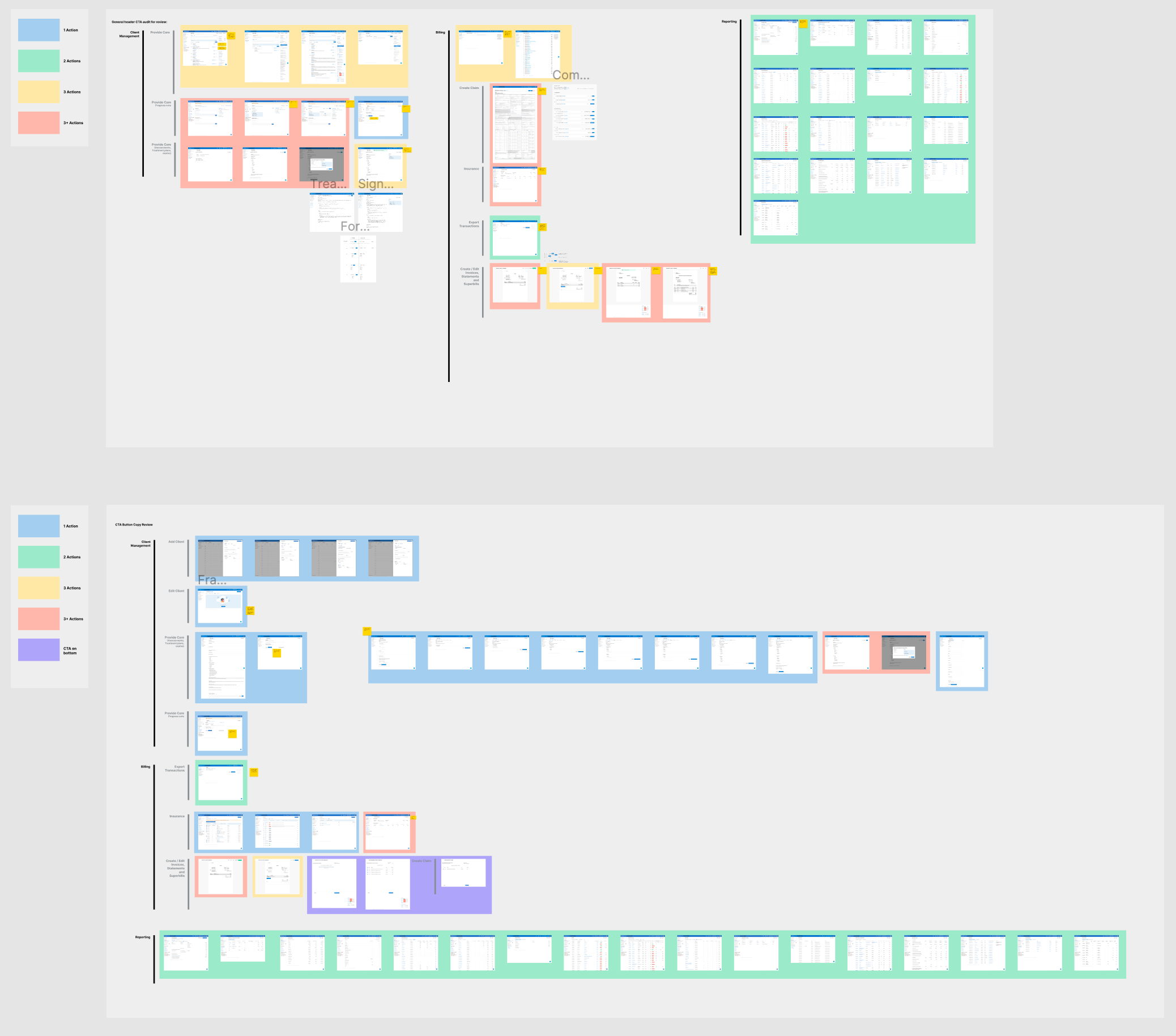
To begin, I performed a full platform audit to identify all pages with header CTA buttons and grouped them into 5 groups: 1 CTA, 2 CTAs, 3 CTAs, 3+ CTAs, and full screen modal toolbar CTAs. By identifying each page with header CTA buttons and grouping them based on the number of buttons, I was able to identify some patterns and build out a basic logic system.

At this point, I was finding more and more edge cases, and pivoted from adjusting the logic to reorganizing some of the button groupings to match the logic. Additionally, I began facilitating workshops with other designers to make decisions on the copy text of buttons, decide what would be considered universal actions that could be turned into icons, and create the final look for the drop down button.

Here’s the deliverable I presented to designers for critique:

Project 3. Navigation Workflow Enhancement Research

In the spirit of taking ownership of my internship experience, I asked my manager for a project that involved a lot more research and customer interaction. A few weeks later, I was added to a group of designers who were focusing on enhancing the navigation workflow of the web product, focusing on improving client searchability and visibility. After an initial screening through the facebook community group and the open feedback form from UserVoice, we identified 2 areas of improvement: the home screen Search bar and the Recently Viewed tab on the left hand toolbar.

After a deliberation meeting with the rest of the navigation team, I was tasked with creating a 2-part research test plan to identify tangible enhancement solutions SimplePractice could implement to improve client searchability. In the test plan, I identify our guiding questions and goals, and spell out explicitly what methods are being used.

For the first part of the research test plan, I created a survey using Maze to gather information about the search bar. Since we already had some background information on the Search bar, we were looking for quantifiable information to validate our decision making. In particular, we were looking to understand the customers’ level of satisfaction with the Search bar’s functionality, frequency of use, and if there were any other search types or domains that they would like to be searchable. While we did get this information in spades, we also received surprising pain points about the client search workflow that we immediately sent to engineering for review.

For the second part of the research test plan, I conducted user interviews with customers to gain deeper qualitative and quantitative understanding on the general client search workflow and how useful a tool the Recently Viewed tab is. Because our questions were more specific and open-ended, asking about individual workflows and preferences, we went with the interview route to accommodate different work styles.

Unfortunately, my internship ended before the navigation team could fully synthesize our findings, but the research I did conduct validated much of our design thinking.

Project 4. Prescribing Clinician Product Expansion Exploration

I had the opportunity to work with a PM intern, Sangeeta, on an exploration project to see how SimplePractice could expand our product to meet the needs of prescribing clinicians. After an initial meeting where Sangeeta shared her research findings, we began a series of daily workshop meetings to discuss specific functionalities that could be implemented. I was tasked with creating mockup prototypes to go with her research presentation to show SimplePractice roadmap managers that this project was worth exploring deeper.

We decided on expanding the client page’s functionality by adding a new tab called “Health Summary” where prescribing clinicians could view, add, delete, and edit client medication, allergy, and vitals information. The process of creating these mockups was an interesting exercise because I had to find a balance in adhering to the design system and branding of SimplePractice while innovating and creating a new interface that would benefit prescribing clinicians specifically.

For the roadmap managers and engineers, I created prototype flows for:

  • Navigating to the Client Health Summary Page
  • Navigating within the Client Health Summary Page to access Medication, Allergy, and Vitals Information
  • The workflow for adding information to Medication, Allergies or Vitals
  • The workflow for editing information for Medication, Allergies or Vitals
  • The workflow for deleting information from Medication, Allergies or Vitals

Collaborating with Sangeeta was an extremely rewarding experience because I learned so much about working alongside a product manager and writing user stories to share with engineers.